
The test file#
A test file is a python script ending with .pyt. If execution of the script results in an exit code of 0, the test passes. Non-zero exit codes indicate some other type of test failure (see Test statuses for additional test statuses). A good test ensures the correctness of output given a set of inputs and should be as simple, and fast running, as possible.
Note
canary also runs vvtest .vvt test files with the restriction that canary assumes that the files are written in Python (vvtest allows for its test files to be written in any language).
Test file structure#
The test file is composed of two parts: directives and the body, each described below.
Directives#
These lines provide instructions to canary regarding the setup and cleanup of the test. These instructions are provided through the canary.directives namespace. For example,
import canary
canary.directives.copy("file.txt")
would copy file.txt from the test’s source directory into the the test’s execution directory.
See Test Directives for more.
Body#
Executable statements that are run during the session’s run phase, for example:
def test():
    assert 2 + 2 == 4
Best practices#
Because .pyt test files are imported during the discovery process, the test body should be contained in one or more functions with an entry point guarded by
if __name__ == "__main__":
    # run the test
Test case expansion#
Test files define one or more test cases. In the simplest case, a test file defines a single test case whose name is the basename of the test file. In more complex cases, a single test file defines parameters that expand to define multiple test cases whose names are a combination of the basename of the test file and parameter/name pairs. For example:
import canary

canary.directives.parameterize("a", (1, 4))
would expand into two test instances, one with the parameter a=1 and one with a=4 as shown.
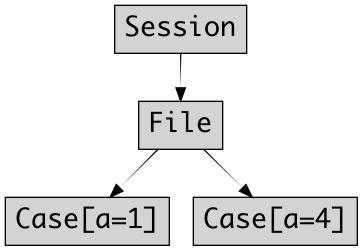
Each test case would execute in its own directory and the test script should query for the value of a and adjust the test accordingly. Test parameters and other test-specific and runtime-specific information are accessed from the canary.test.instance object which is accessible via canary.get_instance():
def test():
    self = canary.get_instance()
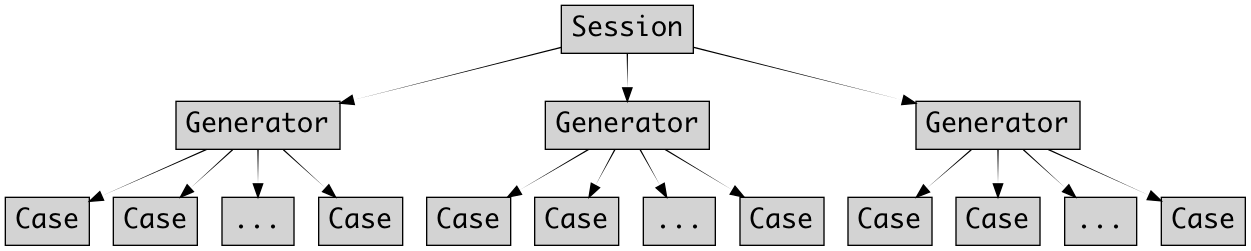
More generally, test files can define an arbitrary number of cases:
A complete example#
# Copyright NTESS. See COPYRIGHT file for details.
#
# SPDX-License-Identifier: MIT

import sys

import canary

canary.directives.parameterize("a", (1, 4))


def test():
    self = canary.get_instance()
    print(f"{self.parameters.a}")
    return 0


if __name__ == "__main__":
    sys.exit(test())
This test file would expand into two test instances, one with the parameter a=1 and one with a=4, as seen with the canary describe command:
$ canary describe parameterize/parameterize1.pyt
--- parameterize1 ------------
File: /home/docs/checkouts/readthedocs.org/user_builds/canary-wm/checkouts/release-26.4.16/src/canary/examples/parameterize/parameterize1.pyt
Keywords:
2 test specs using on_options=:
├── parameterize1.a=1
└── parameterize1.a=4